

Desktop agents are not web apps in a window
Desktop agent lifecycle · Part 1 of 2
Next: Plugin lifecycle failure modes.
A desktop agent looks like a web app with a native shell. Under that shell it usually shares the same agent loop, the same tools, the same session store and often the same UI as the browser build.
That sharing is real, but it covers the runtime. The hard design work starts at the boundary: process ownership, profile control and client state.
This article comes from building plugins around DeepSeek Harness (DSH). DSH is pre-stable, and the observations below are a dated case study. The goal is not to judge one implementation, but to make a common class of desktop agent problems easier to reason about.
The case: a plugin disappeared from the profile, not from the window
A plugin was installed into a DSH desktop profile from a local directory. Later it was removed through the built-in plugin page. The removal did happen:
- the profile dependency was gone;
- the plugin's patch entry was gone;
- the package manager reported a successful
pnpm remove; - the running window still showed the plugin's sidebar entry and composer button;
- restarting the application made it disappear.
None of those facts is surprising on its own. The profile is a set of files; the running application is a set of loaded modules. Removing a dependency changes the files. It does not automatically replace the code that is already running.
What made the case interesting was the interface. The confirmation said the feature would disappear. The implementation had done real work. The running application had not caught up yet.
That gap is the subject of this article: not the specific plugin, but the lifecycle contract that decides when an installation, removal or configuration change becomes visible.
The short version:
- sharing an agent runtime does not mean sharing its lifecycle;
- a plugin can be current in the profile, the host and the client at different times;
- the interface needs to say which of those layers changed.
A shared runtime, a separate control plane
A desktop agent usually reuses:
- the agent and session runtime;
- tool execution and model access;
- the plugin runtime and its manifest;
- the web client UI and its component slots;
- local storage, settings and authentication;
- the profile or bundle model that decides what loads at boot.
DSH makes this explicit: the desktop profile is a bundle stack, just like the web profile. The same plugin package can appear in both. The desktop app is not a second implementation of the agent.
What is not shared is the control plane: the part that decides who may install, remove, reload or restart something, and how those operations are observed.
A desktop process owns:
- the lifetime of the host process;
- the profile lock;
- the application menu and window lifecycle;
- update, crash recovery and relaunch;
- the boundary between the Electron main process and the host.
The host is the process that runs the server-side half of plugins and composes the profile. It is not the Electron window, and it is not the browser page.
Where the models diverge
DSH reserves the profile name desktop for the application. A CLI invocation of the same profile is rejected:
error: profile "desktop" is managed exclusively by the Electron applicationThe restriction is a trade-off, not a missing command. If a CLI writes the profile while the app is running, three views can diverge:
- the files on disk;
- the plugins loaded by the host process;
- the modules mounted in the client page.
The desktop app also contains menu entries for Restart App and Host and Reload Page. In the DSH 0.2.1-rc.5 build examined for this article, those entries are compiled behind a development flag. That is a snapshot, not a permanent property of DSH; future builds may expose them differently. The architectural point is that a desktop shell needs a deliberate control surface for these operations, separate from the CLI.
Four lifecycle layers
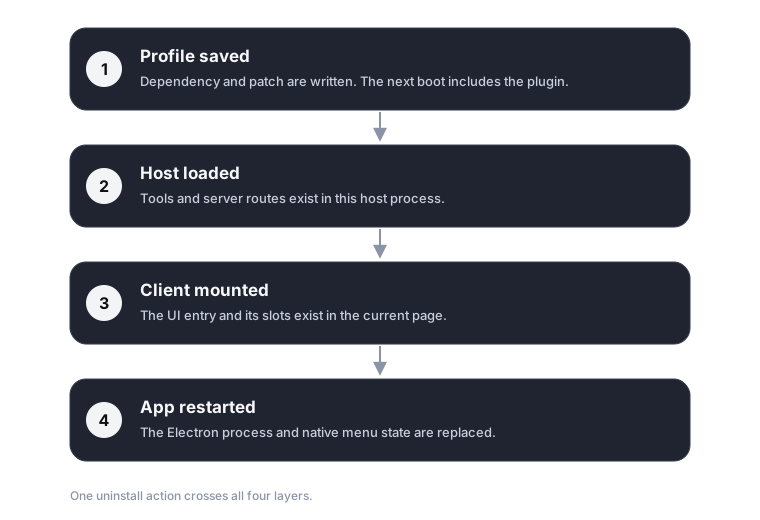
Each layer has its own way of becoming current:
| Layer | What changes it | What it means for a user |
|---|---|---|
| Profile | Dependency and patch are written | The next boot will include the plugin |
| Host | Host loader recomposes | Tools and server routes exist in this process |
| Client | Renderer reloads its module graph | The UI entry and slots exist in this page |
| App | Electron restarts | The whole desktop shell is replaced |
A single "Uninstall" button hides all four.
A plugin can be removed from the profile while its client module is still mounted. It can be disabled in the host but leave a stale button in the renderer. It can be installed on disk but absent from the current page. These are not edge cases invented for a diagram; they are the normal consequence of having four independently updated layers.
Why desktop changes the problem
On the web, the boundary is simpler. A page reload usually re-fetches the client graph, and the server process has one lifecycle.
A desktop agent adds three complications:
- Ownership. The Electron application owns the profile and the app lifecycle. A CLI cannot safely mutate the same files without coordinating with that owner.
- Two runtimes. The host process and the renderer are separate. Code can be unloaded from one and remain in the other.
- A native recovery layer. Restarting the app is not just another HTTP request. It has to shut down the host, flush sessions, relaunch the shell and reconnect the UI.
These are not reasons to avoid desktop agents. They are reasons to treat the desktop shell as a first-class part of the plugin architecture, not as a browser wrapped in a menu bar.
The design space is not "restart vs HMR"
It is tempting to frame this as "use HMR" or "just restart". Both are legitimate designs, and they optimize for different things.
| Approach | Strength | Cost |
|---|---|---|
| Restart-first | Predictable; one code path; easy to reason about | Interrupts sessions; slow feedback; expensive for plugin authors |
| HMR-first | Fast feedback; fewer interruptions | More state to reconcile; client modules may not unload cleanly |
| Managed profile only | Clear ownership; UI can enforce invariants | CLI and automation need a separate surface |
| CLI-first profile | Composable; scriptable | Conflicts with a running app; lock and state ownership are hard |
VS Code is a useful reference point: it has an extension host, an explicit Reload Window command and a mature extension lifecycle. It does not make the problem disappear; it makes the states explicit and gives users a predictable recovery action. A desktop agent can borrow that clarity without copying the implementation.
A minimal lifecycle contract
The exact actions differ by product, but the contract should answer four questions:
- What changed?
- Which layer is current?
- Does the user need to do anything?
- How do they undo or recover?
A small command surface is enough to start:
install
remove
enable
disable
reload-client
restart-app
Each command should return the layer it reached, not just ok:
saved
host-applied
client-reload-required
app-restart-required
failed
The UI should render those states directly. "Restart DSH" should appear only when the state actually requires it. An applied result with a stale client is not an ok from the user's point of view.
Testing the matrix
A lifecycle change should be tested across product shapes and states:
web profile
CLI profile
desktop profileinstall / remove / enable / disable
page reload / app restart
idle / running task
fresh profile / existing profileThe important assertions are not only "does the command exit 0", but:
- is the plugin absent from the next page load?
- are its tools unregistered from the host?
- are running sessions preserved?
- can the user recover without editing files?
- does the confirmation copy match the actual layer reached?
Open questions
This is where an ecosystem can develop shared conventions:
- Should a plugin manifest declare its minimum lifecycle requirement, such as
client-reloadorapp-restart? - Should the package manager expose a profile state API, or should each shell own it?
- Can client plugins expose an unload hook without making every plugin responsible for its own teardown?
- How should a desktop shell prove that a plugin is gone, rather than merely removed from a list?
These questions are more useful than a universal answer. Different products will choose different trade-offs, but they should make the trade-off visible.
What this means for plugin ecosystems
A plugin ecosystem is not only a package format and a loader. It is also a set of promises about when a change becomes visible.
Those promises have to be designed across:
- the package manager and profile;
- the host process;
- the client runtime;
- the desktop shell;
- the documentation that tells people which surface to use.
The shared core makes a desktop agent possible. The control plane makes it predictable.
References
- DeepSeek Harness
- DSH discussion #9658: desktop profile selection
- VS Code extension host
- Electron process model
- Vite HMR
- Cargo profiles
Scope
These observations come from DSH 0.2.1-rc.5 on macOS. DSH is pre-stable; APIs and menus will change. The goal is not to treat one implementation as a permanent conclusion, but to extract a reusable design vocabulary for desktop agents and their plugin ecosystems.